Zack Fox | Mercury
Discipline: EXPERIENTIAL, LIVE VISUALS, SYSTEMS
Tools: TouchDesigner, GLSL, Python, PyTorch, MediaPipe, Azure Kinect, Launch Control XL3, Claude Code
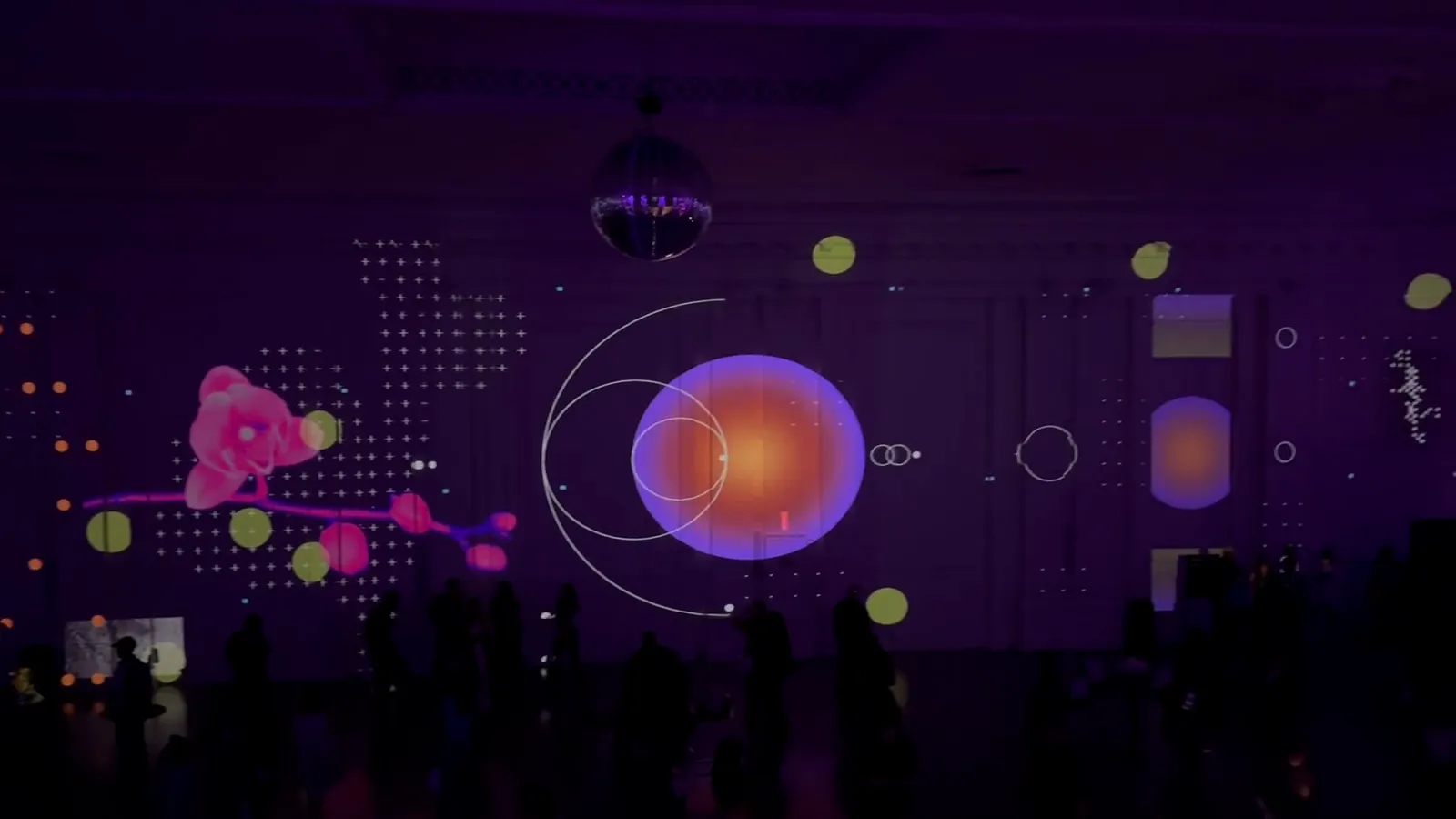
Projection-mapped visuals for the launch of Mercury Command at the Avalon Ballroom, with Zack Fox on the decks. Mercury hired me as the artist: the look and the system behind it were mine.
One modular TouchDesigner network ran the whole wall, played live by one person: guests' hands for the first half of the night, a MIDI controller and the beat for the second.
The Brief
Mercury Command is built on one idea: a small input sets off a large, system-level action. My job was to give that idea a form the size of a room.
I called it diagrammatic precision pushed to the edge of chaos. The visuals borrow from technical documentation (annotations, network diagrams, telemetry), then misbehave: diagrams build on a gesture, breathe on the beat and come apart again. One raised hand, and the whole wall answers.
The language didn't stay on the wall. Mercury took it as the creative direction for the whole launch: the media promotion, the event promotion and the merch all came out of my artwork.
Mercury also posted a recap of the night on Instagram.
Mapping the Venue Remotely
The hardest constraint wasn't software. I couldn't see the room before load-in: a ballroom wall about 156 feet long, covered by four 4K projectors, with arched windows, pilasters, a DJ booth and house lights all on the same surface.
So I worked from the venue's drawings and renders, traced every window and pilaster, and built the canvas on that map. The window diagrams fit the windows, and the grids leave the glass alone.
Anything a drawing couldn't tell me (colour under the house lights, how bright the windows would read, where the booth would land) became a parameter I could tune on site.
System Architecture
The show is one TouchDesigner network of about 2,600 operators, played by one person in two modes, one for each half of the night.
Before the DJ, guests drove it: raise a hand in front of the camera and the diagrams build stage by stage; lower it and they pull back. When the set started, one button switched to DJ mode. Hand tracking shut off, and the same diagrams moved to the MIDI controller and the beat.
The switch is cheap because of one rule: signals are shared, not wired. Every input is read once and published to a shared bus: MIDI, the hand, the beat. Modules listen for the signals they need and are never wired to each other, so changing modes only changes which signal each one listens to, and that choice is one row in a table. Most of the show's behaviour lives in tables like it, from which diagrams a hand builds to when each b-roll clip appears, so changing the show means editing a row.
Read left to right: a gesture lands on a bus, the bus starts a diagram's build, a shader treats it, the layout places it, and it hits the wall. A fader, a tapped beat or TempoNet's estimate takes the same path.
The Diagram Components
The DIA_* modules are one visual system, not seven one-offs: Swiss-style technical drawings of parabolas, radar arcs, nested circles, hubs, gauges, plus-sign grids and window frames.
They share an anatomy of four states, so any of them can answer the same gesture or the same button:
Rest: the diagram at its most minimal, with one small part pulsing so it still reads as live.Build (Pulse): it grows out to its full form.Full idle: the finished diagram holds, breathing, for as long as I want it on the wall.Retract (Reverse): it shrinks back to where it started, ready to build again.
None of it is baked, and nothing gets rewired mid-show. Each diagram is a self-contained component drawn by code, tuned from the outside: everything about it is a parameter, 258 across the seven, on the same pages every time: Geometry for proportions (radii, ratios, gaps, ray counts), Idle for speed and amount, Render for its own resolution so it stays crisp at any size, and BPM for how it moves on the beat, from a smooth swell to a hard tick.
That's what makes them playable. I can change speed or proportion mid-set without breaking the animation, or refit a diagram to a different window by changing a few numbers.
B-Roll Automation
B-roll was the hardest thing to play by hand: eleven clips across a long wall, through a set where the track changed every few minutes. So I split the job. The tempo decides when each clip appears; I decide how much of the wall it fills.
Each clip gets a slot on a circle that stands for one 32-beat phrase. A playhead runs round it at the show's tempo, and a clip is on while the playhead is near its slot. Nothing is cued by hand.
Fader one sets how near counts as near. Low, a clip or two flashes past on the beat; at the top, all eleven are up at once; at the bottom, none. That fader was the performance: I played how full the wall was, and the tempo kept it in time.
Each phrase reshuffles the slots, so the order never repeats, and the reshuffle lands when the wall is nearly dark, so nothing pops. The bench above runs the same code, down to the shuffle, so it deals the order the wall did.
Tempo Detection and Optimization
The computer sat far from the booth, with no clock signal from the decks, and tap tempo takes a hand off the faders every time the track changes. So the show also listened: TempoNet, a PyTorch model running inside TouchDesigner, re-estimated the BPM from the room every second, with tap tempo kept as the override.
At 6720 × 1200 the bottleneck was drawing pixels, not the CPU, so the work was in not drawing: modules switched off when they weren't on screen, and hand tracking stopped in the half that didn't need it. One shader replaced roughly 42,000 instanced circles, and removing a needless image conversion took the beat-synced HUD from 112 ms to about 5.5 ms per redraw.
The shared signals made debugging fast too. When the b-roll fade died mid-run, the trace led straight past the MIDI to a dead tempo signal upstream.
Claude MCP
I built the show with Claude Code connected to the live TouchDesigner session over MCP, so it could read and edit the running network. I used it to profile the network, which is how the HUD slowdown surfaced; to track down a MIDI mapping that scrambled between sessions and a knob bug that swallowed the build and retract buttons; and to draft the runbook for moving the show from my Mac to the venue's Windows PC.
It was strongest on structure. It can't see the GPU output, so it checked the wiring and shaders while I judged the image, and what it learned went into a notes file so each session started where the last one left off.
Takeaways
Tables, not wiring. When behaviour lives in data, changing the show means editing a row.
Components, not copies. Every diagram is one parameterized component, so one fix lands everywhere.
Built to be played. Four shared states and one signal bus made a 2,600-operator show playable by one person, in a room I had never seen.